A Notes App That Fits the ADHD Brain
Built around the moment the thought shows up, not five clicks later.
The problem with most note apps is rarely the app itself. It is the gap between having a thought and getting it written down. For an ADHD brain, that gap is where the thought dies. You think of something, you reach for the app, you open a new tab, the app loads, you wait, and by the time the cursor is blinking the idea has already dissolved. What you are left with is the frustrating knowledge that there was something, without any trace of what it was.
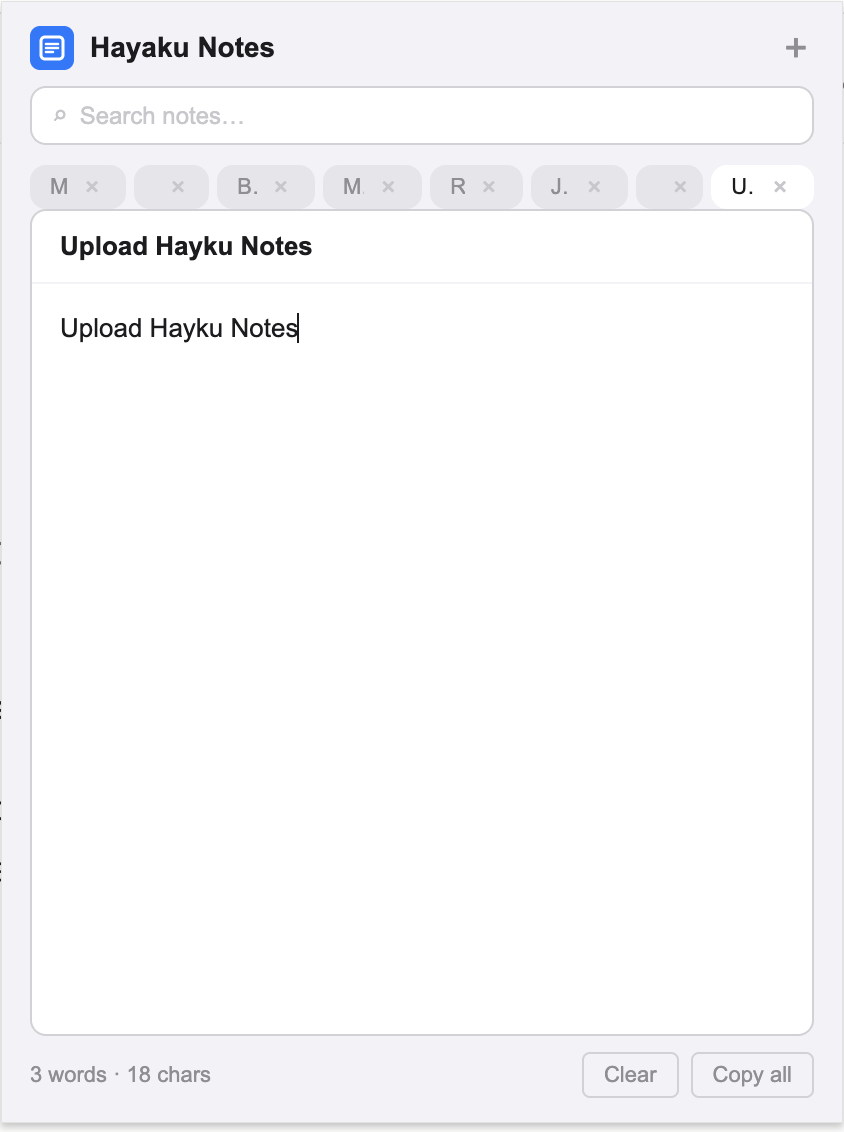
Hayaku Notes was built to close that gap. It is a Chrome extension that lives as a small icon in your toolbar. You click it, a notepad drops down over whatever page you are already looking at, and you type. No new tab, no separate window, no context to lose. This article walks through why that specific design tends to work for people who have spent years failing to keep a notes habit going.
The thought is gone before the app opens
ADHD working memory is short and easily overwritten. A thought can be crowded out by the next thing before you finish the sentence in your head. The usual advice is to write things down, which is correct, except the standard tools add just enough friction to lose the race. Opening a dedicated app pulls you out of what you were doing, and the act of switching away is often enough to erase the thing you switched away to capture.
Because Hayaku opens on top of the current page, there is no switch. The page you were reading stays where it is behind the notepad. You are not navigating anywhere, so there is nothing to distract you between the thought and the writing. The idea goes down while it is still there.
Out of sight really does mean out of mind
Object permanence is a common sticking point. A note saved into a folder you never reopen might as well not exist. Elaborate systems with nested notebooks and tags tend to collapse for exactly this reason: the structure requires you to remember to go back and maintain it, and maintenance is the first thing to fall off.
Hayaku keeps this deliberately flat. There are no folders to organise and no filing to keep up with. You open the pad, your notes are there, and that is the whole interface. Nothing is hidden three levels deep waiting for you to remember it.
Separate notes without the overhead
ADHD attention jumps between subjects, and forcing everything into one long document turns it into a wall you stop reading. Hayaku uses simple note tabs, so a shopping list, a half-formed idea, and a link you want to keep can each sit in their own note instead of piling into one blur. Switching between them is a click, not a hunt through a hierarchy you have to have set up in advance.
Finding it later, when you have no memory of where you put it
Even with flat notes, the honest truth is that you will not remember where a given thing went. Hayaku has real-time search that filters as you type and highlights the matching text inside your notes. You do not need to recall which note something lives in. You type a fragment you do remember, and it surfaces. For a brain that stores things by association rather than by folder, searching on a scrap is far more reliable than trying to retrace your own filing logic. If you want to see how that search behaviour compares with the other note extensions in the Chrome store, there is a side by side look at the field as well.
No save button to forget
"Did I save that" is a small anxiety that adds up. Hayaku saves automatically as you type, a fraction of a second after you stop, so there is no button to remember and nothing lost when you close the pad or the tab. The counterpart to autosave is the fear of deleting the wrong thing on impulse, which is why Hayaku keeps a deep undo history. You can step back through roughly thirty changes, so a hasty edit or an accidental clear is not permanent.
No account, nothing to set up
The setup step is where most note habits die before they begin. Creating an account, confirming an email, choosing a password, and figuring out sync is a lot of activation energy for something that was supposed to be quick, and for an ADHD brain that upfront cost is often enough to abandon the whole thing on day one. Hayaku asks for none of it. You install it and start typing. It is part of a small group of note apps that skip the login entirely, which removes the one barrier that tends to stop people at the door.
Your notes are stored locally in your own browser using Chrome's built-in storage. Nothing is uploaded, and there is no server holding your writing. Besides the obvious privacy benefit, this is also why there is nothing to configure. If keeping your notes off the cloud matters to you, Hayaku sits alongside the other non-cloud note options that keep everything on the device in front of you.
What it costs
Hayaku is free for up to fifty notes, which is enough to find out whether it fits the way you think before any money is involved. Past that, a single payment of $5.97 unlocks unlimited notes for good. There is no recurring charge and nothing to cancel later, which suits a brain that would rather not track another monthly line item. For the same reason, it fits in with the other note apps that charge once instead of every month.
Where it fits
Hayaku Notes will not organise your life, and it is not trying to. It does one narrow thing, which is to catch a thought in the second you have it, before the second passes. For a lot of ADHD brains, that single reliable step is worth more than a feature-heavy system that looks impressive and gets abandoned by the end of the week. The test is simple enough: install it, and see whether the notes you meant to keep actually stay caught.
Catch the thought before it goes.
The yellow icon sits in your toolbar, one click from a blank pad.
Get it on Chrome Web Store