Take notes online, without a login.
Some note tools ask you to sign up before you can type a single word. These are the Chrome extensions you can install and use with no account. Below, six of them side by side, and where each one actually stores your notes.
| Extension ↕ | No login ↕ | Stays on device ↕ | Toolbar ↕ | Price ↕ |
|---|---|---|---|---|
📄Hayaku NotesOurs |
✓ | ✓ | ✓ | Free to 50 notesThen $5.97 once |
nunuTabOpens in new tab |
✓ | ✓ | ✗ | Free |
NDNew Tab DraftOpens in new tab |
✓ | ✓ | ✗ | Free |
GDNotes for Google DriveGoogle account required |
✗ | ✗ | ✓ | Free |
DiDiigo Web CollectorDiigo account required |
✗ | ✗ | ✓ | FreePaid from $40/yr |
WHWeb HighlightsAccount for full features |
✗ | ✗ | ✓ | FreePaid tiers available |
No login = you can install and start typing without creating an account. Stays on device = notes are saved in your browser, not uploaded to a server. Toolbar = you can open it from the Chrome toolbar in one click.
Want one with no login at all?
Hayaku Notes installs, opens from your toolbar, and lets you type right away. No account, no cloud. Free to 50 notes, then $5.97 once.
Get Hayaku Notes →The full breakdown
Hayaku Notes
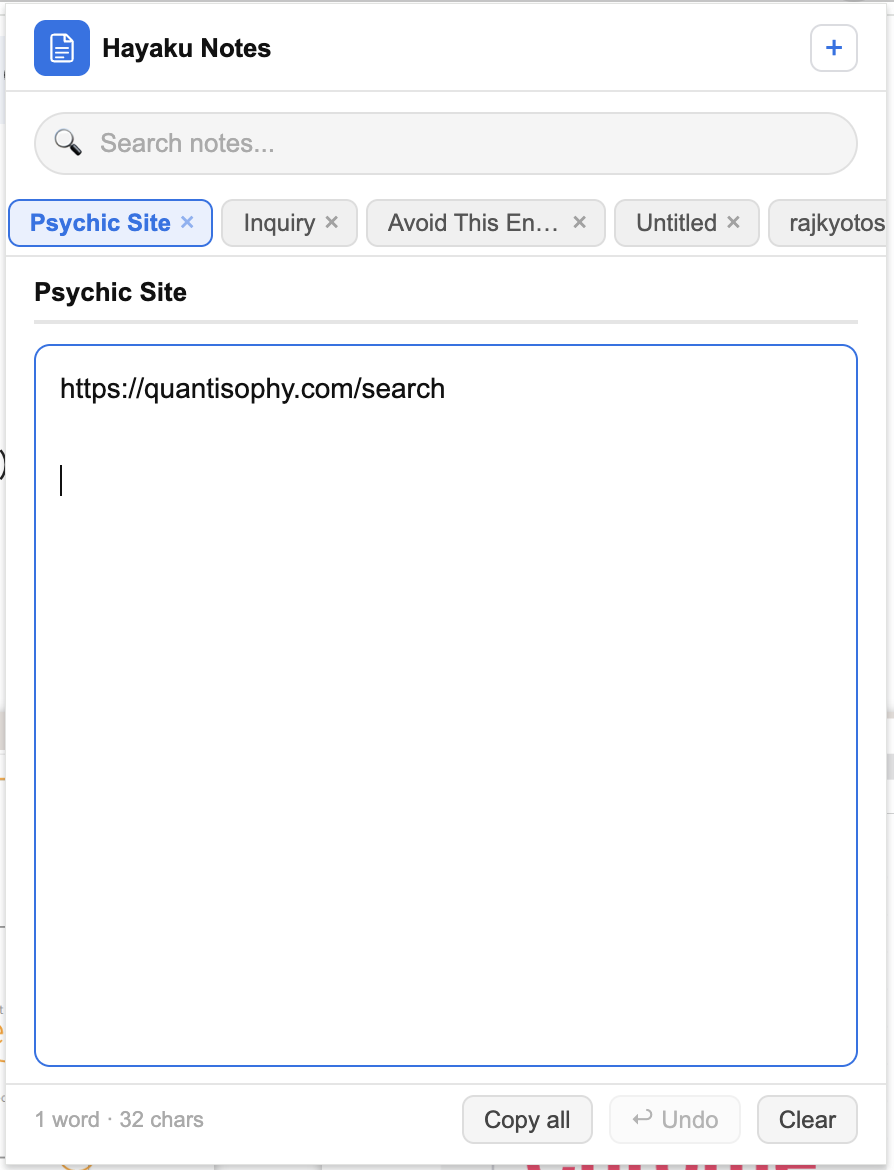
Why search for a no-login note tool? Because most apps make you sign up, verify your email, and create a password before you can write a single word.
Hayaku Notes skips all of that. It installs as a browser extension in seconds. Just click the icon and start typing. No accounts, no email forms, and zero ads, even on the free version.
How it works
Instead of saving to a cloud server, Hayaku stores your notes locally in your browser. Two big benefits:
• Total privacy: your data never leaves your machine.
• Instant speed: nothing to load, so it works the second you click it.
The trade-off
Because there's no cloud, your notes won't sync to your phone or other computers. If you need multi-device syncing, you'll want an account-based tool. But if you just want fast, private notes on your main computer, local storage is a feature, not a bug.
Daily use
Open it from your toolbar, type (links, code, lists), and close it. It auto-saves instantly. To keep things clean, it includes:
• Quick tags and a search bar.
• Live word and character counts.
• No complex folders or formatting menus to learn.
Pricing
• Free: up to 50 notes.
• Paid: a one-time $5.97 for unlimited notes (no subscription).
Bottom line: Hayaku is built for anyone who wants to bypass the login screen. Fast, private, and lightweight. If you need folders, sync, or rich formatting, look elsewhere. But if you just want to write, this is it.
nuTab
nuTab lives on your new tab instead of the toolbar. Open a new tab and the blank page becomes a place to write, plus a spot for your favorite links. No account needed, so you install it and start writing right away.
What stands out
• Markdown support that formats as you type, good for light headings and lists.
• Notes saved on your machine, with markdown export whenever you want a copy.
• Light and dark themes, built to open fast.
The catch
It's not a toolbar tool. You reach your notes by opening a new tab, which pulls you off the page you're reading. And it takes over your new tab, so whatever you had there (shortcuts, a start page) gets replaced.
Bottom line: great if you want a no-login, on-device place to write with a little markdown, reached through the new tab. If you'd rather jot from the toolbar without changing your new tab, look at a toolbar tool.
New Tab Draft
New Tab Draft turns your new tab into a distraction-free writing space. Open a new tab and you get a clean surface with the clutter stripped away. No login, and your text stays in the browser, not a cloud service.
What stands out
• Mostly blank space, built for writing without visual noise.
• No account to create, install and go.
• Always one new tab away when a thought hits.
The catch
Same as any new tab tool. It's not on the toolbar, so capturing a note means opening a new tab and stepping away from what you were looking at. And it replaces whatever your new tab page shows now.
Bottom line: good for a writer or thinker who wants a bare, no-login page to draft on, reached through the new tab. If you want quick toolbar capture or a more structured system, it's built for a different need.
Notes for Google Drive
Notes for Google Drive is here for contrast. It saves your notes into your Google Drive, which means you have to sign in with a Google account. If you're searching specifically to skip the login, that alone may rule it out, and we mark it plainly.
What you get
• Sync. Notes live in Drive, so they show up on your other devices.
• Fits neatly if you already live in Google's tools.
• Opens from the toolbar, one click while staying on the page.
The catch
It's the mirror image of the local tools. Your notes sit in the cloud on Google's servers, and you can't use it at all without an account. Not good or bad, just a trade: sync on one side, no-login privacy on the other.
Bottom line: a solid pick if you're fine signing in with Google and want notes that sync through Drive. Wrong pick if your whole goal was to skip the login and keep notes on your own device.
Diigo Web Collector
Diigo Web Collector is a research tool as much as a note tool, and it's been around for years. You highlight text on web pages and PDFs, add sticky notes right on the page, and bookmark and tag pages to build a searchable library of what you've read.
What stands out
• Highlighting and annotation directly on pages and PDFs.
• Everything tagged and stored, so you can find it weeks later.
• Strong for students and researchers pulling together sources.
The catch
It needs an account. Your highlights and links live in a Diigo library online, not on your device, so it's firmly in the account-based group. The interface also carries more on screen than a plain note tool.
Pricing: free core tool, with a paid plan its listing puts around $40/year for extras like unlimited PDF storage and collaboration.
Bottom line: good for a reader or researcher who's fine signing in and wants to highlight, annotate, and file web content into a searchable library. Not the tool if you just want to type a quick note with no account.
Web Highlights
Web Highlights is another annotation tool rather than a plain note taker. You highlight text on any web page or PDF, attach notes to those highlights, and they reappear when you come back to the page. It also offers summaries of what you've marked.
What stands out
• Highlights stick to the page and notes attach to specific passages.
• Gather and review everything you've marked.
• Runs from the toolbar, one click while staying on the page.
The catch
It's a middle case on login. You can start highlighting, but the full feature set and cross-device sync expect an account, and that synced material sits in the cloud. So it's not a no-login, on-device tool like the ones at the top. If skipping an account entirely is your line, read its terms first.
Bottom line: good for a reader who wants durable highlights and notes across devices and doesn't mind an account for the full experience. If you strictly want no login and notes kept on your own device, the local tools above are the cleaner match.
The simplest no login option
Install, click the toolbar icon, start typing. No account, no cloud, no ads. Free to 50 notes, then $5.97 once.
Get Hayaku Notes on the Chrome Web Store →Comparing more broadly? See the full comparison of the best Chrome note extensions, or read about Hayaku Notes on its own page.