A NotebookLM Alternative for People Who Just Want to Take Quick Notes
NotebookLM is a research assistant. Hayaku Notes helps you jot down what you need right away. Which one fits depends on what you are trying to do.
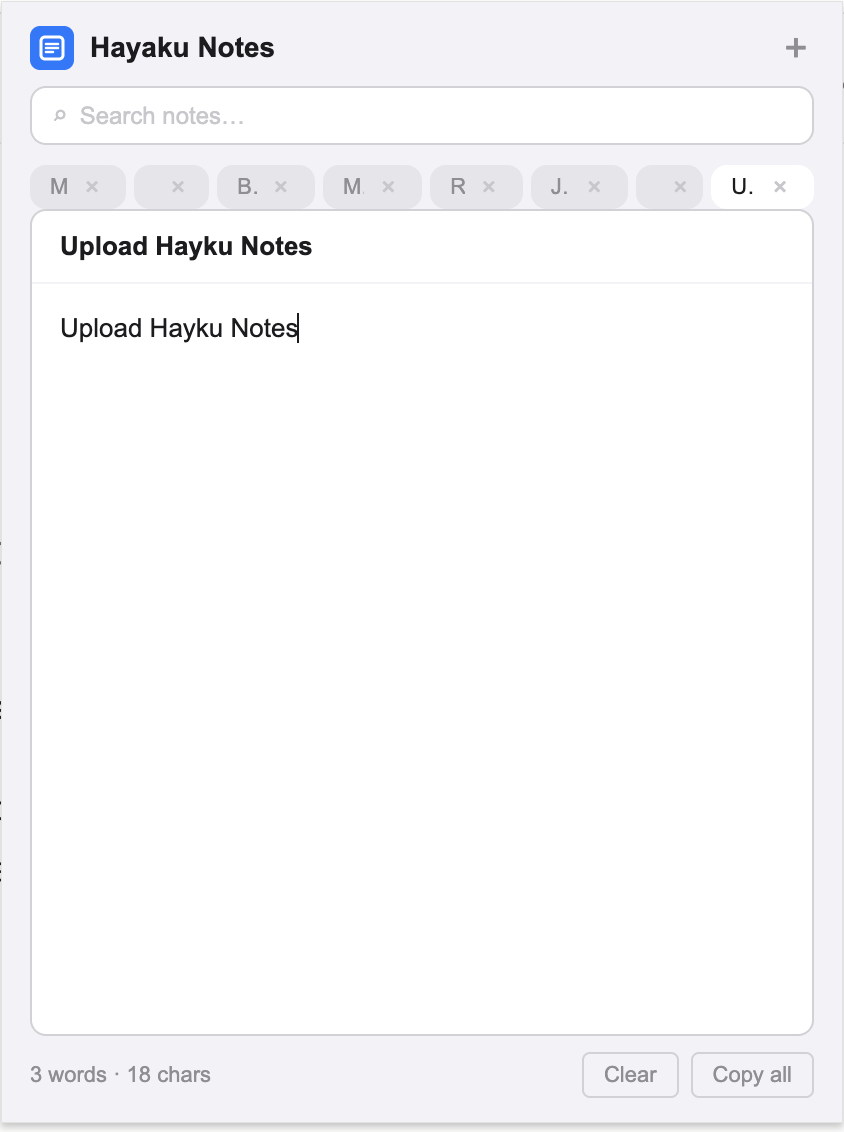
Tired of leaving Chrome just to take simple notes? If you are looking for a NotebookLM alternative, you have probably already tried Google’s tool. You uploaded a PDF or pasted a link, waited for the AI to process it, and then asked questions about the content. That workflow is excellent for distilling long documents into summaries or finding connections across research papers. But it is not designed for the moment when you are filling out a form, reading a news article, or watching a video and a thought appears that has nothing to do with any uploaded document. NotebookLM has no quick-capture function. There is no blank pad to open, no place to type a phone number or a reminder without first creating a source. Hayaku Notes fills that gap. It is a Chrome extension that drops a notepad over your current tab. One click, no upload, no processing wait, no source to manage. This article walks through where NotebookLM leads, where it leaves quick capture unserved, and why some users keep NotebookLM for research and install Hayaku for everything else. If you are comparing tools across the board, our breakdown of Notion as an alternative covers another common option people weigh against lighter tools.
What NotebookLM does that Hayaku never will
NotebookLM ingests documents — PDFs, Google Docs, pasted text, and web links — and uses AI to generate summaries, answer questions, and surface themes across sources. If you are writing a thesis, analysing legal briefs, or comparing market reports, NotebookLM is the correct tool and Hayaku is not a replacement for it. Hayaku does not ingest documents, does not run AI analysis, and does not generate summaries. The comparison only applies to the narrow task of writing a spontaneous note while you are already inside Chrome.
The upload-and-wait cycle
NotebookLM requires a source before it can do anything. To add a thought, you either upload a file or paste a link, wait for the system to process it, and then interact with the generated summary. For research, that delay is acceptable because the payoff is a condensed version of a fifty-page document. For a two-sentence reminder, the same delay is absurd. You cannot open NotebookLM and immediately start typing an unrelated thought. The architecture assumes every note is a response to a source.
Hayaku reverses that assumption. There is no source, no upload, and no processing step. You click the toolbar icon and the notepad appears over your current page instantly. You type the thought, close the pad, and resume what you were doing. The tool is ready before the idea fades.
AI summaries versus plain capture
NotebookLM’s output is AI-generated. It paraphrases, extracts bullet points, and suggests connections. This is useful when you want a machine’s interpretation of a document. It is less useful when you want your own exact words preserved without alteration. A phone number, a quote you want to record verbatim, or a password must be typed manually anyway, and NotebookLM offers no faster path for that than any other document editor.
Hayaku records exactly what you type, character for character, with no AI layer between your fingers and the saved text. There is no summarisation, no rewriting, and no suggestion engine. The trade-off is that Hayaku will not condense a research paper for you. The benefit is that your own words stay untouched.
The Google account and access barrier
NotebookLM requires a Google account and is only available in select regions. If you are not already signed into Google, or if you live outside the supported countries, you cannot use the tool at all. Even within supported regions, the service can be restricted or changed at Google’s discretion, as has happened with other experimental Google products.
Hayaku has no account requirement and no regional lock. You install it from the Chrome Web Store and it works immediately. Your notes are stored locally in your browser. Nothing is uploaded to Google or any other server. If keeping your notes off the cloud matters to you, Hayaku is one of the non-cloud note options that keep everything on your own device. It is also part of the smaller group of note apps that skip the login entirely, which removes the activation energy that stops some people before they start.
Finding what you wrote
NotebookLM organises content by source. Your notes live inside projects, attached to the documents that generated them. If you remember writing something about a specific PDF, you navigate to that source and read the AI chat history. But if you wrote a standalone reminder that was not tied to any document, there is no central inbox to search. You may find yourself opening multiple projects to locate a single sentence.
Hayaku keeps all your notes as tabs inside the extension. A single real-time search filters them as you type and highlights the matching text inside each note. You remember a word, you type it, and the note appears. There are no projects to open and no source documents to traverse.
What it costs
NotebookLM is currently free with a Google account, though usage limits apply and Google has indicated that pricing may change as the product matures. For users who have watched other Google services shift from free to paid or shut down entirely, that uncertainty is a consideration.
Hayaku is free for up to fifty notes, which is enough to decide whether the tool fits your workflow. After that, a single payment of $5.97 unlocks unlimited notes permanently. There is no subscription and nothing to cancel later. If you specifically want a tool that does not turn into another monthly bill, Hayaku is one of the note apps that charge once instead of every month.
Who should keep using NotebookLM
If you are processing long documents, generating research summaries, or using AI to extract themes across multiple sources, NotebookLM is the better tool. Hayaku Notes is not trying to replace that. It is a single-purpose extension for a different job.
Who should try Hayaku instead
If you find yourself opening NotebookLM and realising you have nothing to upload, if your quick thoughts keep dying because the tool expects a document first, or if you just want a notepad that appears over your current tab without AI processing or source management, Hayaku is worth testing. It installs in seconds and the free tier costs nothing.
The bottom line
NotebookLM is a research assistant. Hayaku is a notepad. One is not objectively better; they are built for different depths of use. If you need AI-powered document analysis, NotebookLM is the answer. If you are tired of leaving Chrome just to take simple notes, Hayaku is the alternative some users switch to. The test is straightforward: install it, use it for a week, and notice whether the notes you meant to keep actually get written down.
Stop leaving Chrome to take a note.
The yellow icon sits in your toolbar, one click from a blank pad.
Get it on Chrome Web Store