An Obsidian Alternative for People Who Just Want to Take Quick Notes
Obsidian is a knowledge base. Hayaku Notes helps you jot down what you need right away. Which one fits depends on what you are trying to do.
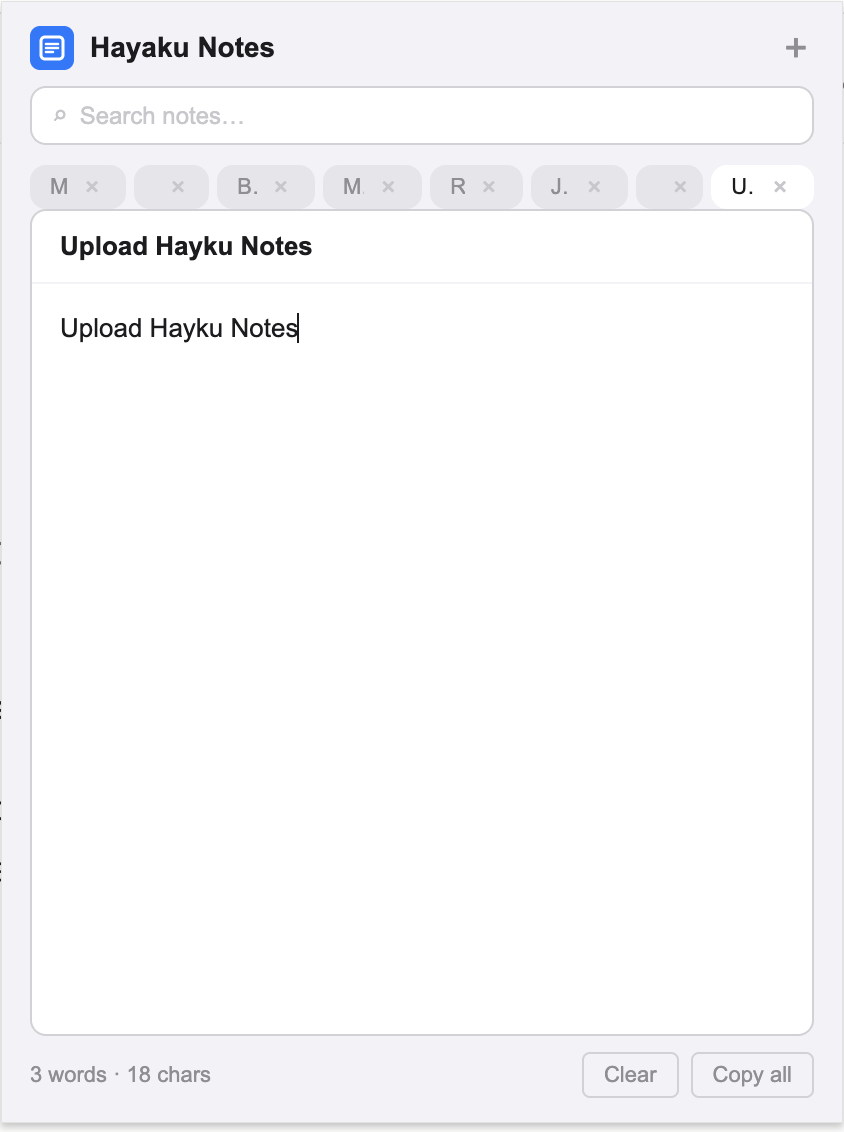
Tired of leaving Chrome just to take simple notes? If you are looking for an Obsidian alternative, you have probably already built a vault or two. You have seen the graph view, you have linked your thoughts, and you have spent an evening installing plugins to get the interface exactly right. Obsidian is a remarkable tool for building a personal knowledge base. But when a thought strikes while you are in the middle of reading an article or filling out a form, opening Obsidian means navigating to your vault, waiting for the workspace to load, deciding which file to edit, and possibly typing markdown syntax before the idea is even on the screen. For a quick capture, that sequence is often too long. Hayaku Notes removes the sequence entirely. It is a Chrome extension that drops a plain-text notepad over your current tab. One click, no vault, no syntax, no setup. This article walks through where Obsidian leads, where it adds friction for spontaneous notes, and why some users keep Obsidian for deep work and install Hayaku for the moments in between.
What Obsidian does that Hayaku never will
Obsidian stores your notes as plain markdown files on your own hard drive. It offers bi-directional linking, a graph view of your knowledge network, and a plugin ecosystem that lets you customise almost every part of the interface. If you are building a Zettelkasten, writing a research wiki, or connecting ideas across hundreds of documents, Obsidian is the correct tool and Hayaku is not a replacement for it. Hayaku does not use markdown files, does not offer linking, and does not have a graph view. The comparison only applies to the narrow task of writing a quick note while you are already inside a browser.
The setup that costs you the thought
Obsidian requires a vault — a folder on your computer that holds your notes. Before you write your first word, you choose a location, name the vault, and decide on a folder structure. That structure then shapes every note you create. A quick capture becomes a decision about where the file belongs, what to name it, and whether it links to anything else. For deep work, that structure is the point. For a phone number or a half-formed sentence, it is overhead.
Hayaku has no vault and no folders. You install the extension, click the icon, and the notepad appears. Your notes live as tabs inside the extension. There is no file system to manage and no naming convention to follow. The trade-off is that you cannot export a folder of markdown files or browse your notes in a file manager. The benefit is that you can start writing before the thought disappears.
Markdown versus plain text
Obsidian uses markdown. Headers, bold, italics, links, and tables all require syntax. If you write in markdown regularly, this is second nature. If you do not, it is one more thing to remember when you are trying to get an idea down quickly. You may find yourself stopping to look up how to format a link or whether you need two asterisks or one.
Hayaku uses plain text. There is no syntax to learn and no formatting to remember. You type words, they appear, and that is the entire interaction. If you need rich formatting, Hayaku will not satisfy you. If you just need the words to exist somewhere before you forget them, the lack of syntax is the feature.
The plugin rabbit hole
Obsidian’s plugin library is vast. Themes, daily notes, spaced repetition, calendar views, and automation tools let you build a customised workspace. The risk is that the workspace itself becomes a project. You install a plugin to improve your workflow, then another to fix a problem created by the first, and before long you are managing a configuration instead of writing notes. This is not a flaw in Obsidian; it is a natural result of deep customisability. But for someone who wants to jot down a thought and move on, the temptation to optimise can be a distraction.
Hayaku has no plugins, no themes, and no settings to tweak. The interface is fixed. The trade-off is that you cannot extend it. The benefit is that there is nothing to configure and nothing to break.
Data location
Obsidian keeps your notes as local files on your machine. This is genuine local-first storage — your data never leaves your hard drive unless you choose to sync it. If you want full ownership of your files in a portable, open format, Obsidian is one of the best options available.
Hayaku stores your notes inside Chrome’s local storage. They never leave your browser and nothing is uploaded to a server. But they are not individual files you can browse in Finder or Explorer. If keeping your notes off the cloud matters to you, Hayaku is one of the non-cloud note options that keep everything on your own device. It is also part of the smaller group of note apps that skip the login entirely, which removes the activation energy that stops some people before they start.
Finding what you wrote
Obsidian offers multiple ways to locate a note. The graph view shows connections between ideas. Backlinks reveal which documents point to the one you are reading. The quick switcher jumps between files by name. These tools are powerful when your vault is large and interconnected. But if you wrote a quick note three days ago and cannot remember which file it lives in, the graph view does not help. You may end up browsing folders or running a text search across your entire vault.
Hayaku uses a single real-time search that filters your note tabs as you type and highlights the matching text inside each note. You remember a word, you type it, and the note appears. There are no folders to traverse and no graph to interpret.
What it costs
Obsidian is free for personal use. Advanced features like sync, publish, and collaborative editing require a subscription or a one-time license purchase. For a free tool, the feature set is unusually deep.
Hayaku is free for up to fifty notes, which is enough to decide whether the tool fits your workflow. After that, a single payment of $5.97 unlocks unlimited notes permanently. There is no subscription and nothing to cancel later. If you specifically want a tool that does not turn into another monthly bill, Hayaku is one of the note apps that charge once instead of every month.
Who should keep using Obsidian
If you are building a connected knowledge base, writing in markdown, relying on bi-directional links, or you value the ability to export your notes as plain text files, Obsidian is the better tool. Hayaku Notes is not trying to replace that. It is a single-purpose extension for a different job.
Who should try Hayaku instead
If you have spent more time configuring Obsidian than writing in it, if the vault setup feels like a barrier every time you want to capture something small, or if you just want a notepad that appears over your current tab without opening a separate application, Hayaku is worth testing. The free tier costs nothing but the install time.
The bottom line
Obsidian is a knowledge base. Hayaku is a notepad. One is not objectively better; they are built for different depths of use. If you need a knowledge base, Obsidian is the answer. If you are tired of leaving Chrome just to take simple notes, Hayaku is the alternative some users switch to. The test is straightforward: install it, use it for a week, and notice whether the notes you meant to keep actually get written down.
Stop leaving Chrome to take a note.
The yellow icon sits in your toolbar, one click from a blank pad.
Get it on Chrome Web Store