An Evernote Alternative for People Who Just Want to Take Quick Notes
Evernote is a full archive. Hayaku Notes helps you jot down what you need right away. Which one fits depends on what you are trying to do.
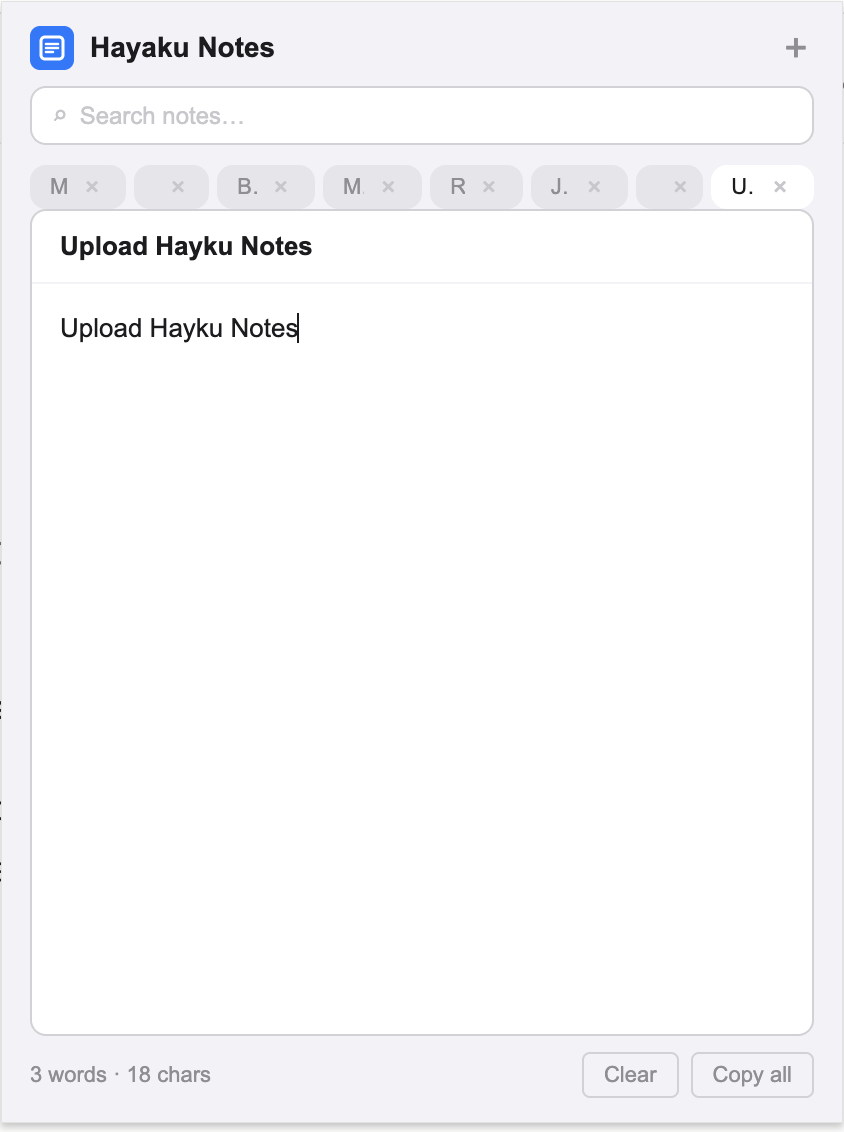
Tired of leaving Chrome just to take simple notes? If you are looking for an Evernote alternative, you have probably noticed that Evernote does a lot of things well — web clipping, document scanning, OCR search, and cross-platform sync — but that same breadth can make it feel heavy when all you want is to write down a sentence before you forget it. You open Evernote, the app initializes, your notebook list loads, and by the time you are ready to type, the thought has moved on. Hayaku Notes was built for that specific moment. It is a Chrome extension that drops a notepad over whatever tab you are already in. One click, no new tab, no load time. This article walks through where Evernote still leads, where it creates friction for quick capture, and why some users keep Evernote for long-term storage and install Hayaku for the notes they take in the middle of doing something else.
What Evernote does that Hayaku never will
Evernote’s web clipper, OCR search, and document scanning are category-leading features. If you save articles, scan receipts, or need to search inside PDFs and images, Evernote is the correct tool and Hayaku is not a replacement for it. Hayaku does not clip web pages, does not scan documents, and does not run OCR. The comparison only makes sense for the narrower use case of writing quick text notes while you are already inside Chrome.
The load time that costs you the thought
Evernote is a full application. Whether you use the desktop app or the web version, opening it involves initialization, sync checks, and notebook rendering. On older hardware or slower connections this can take several seconds. For a deep research session, several seconds is irrelevant. For a fleeting thought — a phone number, a reminder, a correction to something you just read — several seconds is often the difference between capture and loss.
Hayaku eliminates that wait because it lives inside Chrome. You click the toolbar icon and the notepad appears over your current page in less than a second. The article you were reading stays where it is behind it. You type, you close it, and you resume. The context never shifts.
Notebook hierarchy versus flat tabs
Evernote organises notes into notebooks, stacks, and tags. This works well when you have thousands of notes and need a system to keep them sorted. The cost is that every new note requires a decision about where it belongs. For quick captures, that decision is friction. You have to pick a notebook, or create a new one, or leave the note in an inbox you will sort later.
Hayaku uses a flat structure. Your notes live as tabs inside the extension. There are no notebooks to assign, no stacks to maintain, and no filing logic to keep up with. The trade-off is that it will never scale to a ten-year archive. The benefit is that there is nothing to organise and nothing to forget to organise.
Pricing and ownership
Evernote operates on a subscription model. The free plan is limited to two devices and a monthly upload cap, and the paid plans have increased in price over the past several years. For users who have been on Evernote since the early days, the shift from a one-time or low-cost model to a recurring subscription at a higher tier has been a common reason to look elsewhere.
Hayaku is free for up to fifty notes, which is enough to decide whether the tool fits your workflow. After that, a single payment of $5.97 unlocks unlimited notes permanently. There is no subscription and nothing to cancel later. If you specifically want a tool that does not turn into another monthly bill, Hayaku is one of the note apps that charge once instead of every month.
Data location
Evernote stores your notes on its servers. This enables cross-device sync and web access, which is the point of the service. The trade-off is that your notes live on Evernote’s infrastructure, and exporting them in a usable format if you ever leave is a known pain point — the .enex format does not translate cleanly into other apps.
Hayaku stores your notes locally in your browser using Chrome’s built-in storage. Nothing is uploaded to a server. If keeping your notes off the cloud matters to you, Hayaku is one of the non-cloud note options that keep everything on your own device. It is also part of the smaller group of note apps that skip the login entirely, which removes the activation energy that stops some people before they start.
Finding what you wrote
Evernote’s search is powerful across a large archive, especially with OCR enabled. It indexes note titles, body text, and text inside images and PDFs. But if your quick notes are scattered across an inbox, a daily log, and a few general notebooks, the results can be broad. You may find yourself opening several notes to locate the right sentence.
Hayaku uses a single real-time search that filters your note tabs as you type and highlights the matching text inside each note. You remember a fragment, you type it, and the note surfaces. There are no nested locations to check and no OCR to configure.
Who should keep using Evernote
If you rely on web clipping, document scanning, OCR search, cross-device sync, or you maintain a large archive of notes accumulated over years, Evernote is the better tool. Hayaku Notes is not trying to replace that. It is a single-purpose extension for a different job.
Who should try Hayaku instead
If you find yourself opening Evernote less and less because the load time feels disproportionate to the size of the note, if your quick-capture habit keeps dying at the notebook-selection stage, or if you just want a notepad that appears over your current tab without navigating away, Hayaku is worth testing. The free tier costs nothing but the install time.
The bottom line
Evernote is an archive. Hayaku is a notepad. One is not objectively better; they are built for different depths of use. If you need an archive, Evernote is the answer. If you are tired of leaving Chrome just to take simple notes, Hayaku is the alternative some users switch to. The test is straightforward: install it, use it for a week, and notice whether the notes you meant to keep actually get written down.
Stop leaving Chrome to take a note.
The yellow icon sits in your toolbar, one click from a blank pad.
Get it on Chrome Web Store